Logo image

Section 5.1 The <repeat> element

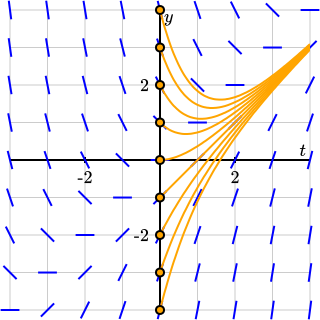
Some diagrams contain a number of components that are similar and differ only in a few attributes. For example, Figure 5.1.1 shows several solutions to a differential equation with different initial values.
Figure 5.1.1. Several solutions to a differential equation.
Of course, we could simply include a <plot-de-solution> element for each one, but this could be difficult to maintain if we decide to make some small change. Instead, PreFigure offers a <repeat> element that can streamline this process, as illustrated by the PreFigure source code in Listing 5.1.2.
Listing 5.1.2. The PreFigure source for Figure 5.1.1.
<diagram width="300" height="300" margins="10">
  <definition>f(t,y) = t-y</definition>
  <coordinates bbox="[-4,-4,4,4]">
    <grid at="grid"/>
    <axes at="axes" xlabel="t" ylabel="y"/>
    <slope-field at="slope-field" function="f"/>
    <repeat parameter="k=-4..4">
      <plot-de-solution at="solution" function="f" t0="0" y0="k"
                        domain="[0,4]" stroke="orange" />
      <point at="initial-value" p="(0,k)" size="4" fill="orange" />
    </repeat>
  </coordinates>

  <annotations>
    <annotation ref="figure"
                text="Solutions to the differential equation dy dt = t - y">
      <annotation ref="grid" text="The coordinate grid"/>
      <annotation ref="axes" text="The coordinate axes"/>
      <annotation ref="slope-field" text="The slope field"/>
      <annotation ref="solutions" text="A collection of solution curves">
        <annotation ref="solution-k_-4"
                    text="The solution with initial value -4"/>
        <annotation ref="solution-k_-3"
                    text="The solution with initial value -3"/>
        <annotation ref="solution-k_-2"
                    text="The solution with initial value -2"/>
        <annotation ref="solution-k_-1"
                    text="The solution with initial value -1"/>
        <annotation ref="solution-k_0"
                    text="The solution with initial value 0"/>
        <annotation ref="solution-k_1"
                    text="The solution with initial value 1"/>
        <annotation ref="solution-k_2"
                    text="The solution with initial value 2"/>
        <annotation ref="solution-k_3"
                    text="The solution with initial value 3"/>
        <annotation ref="solution-k_4"
                    text="The solution with initial value 4"/>
      </annotation>
    </annotation>
  </annotations>

</diagram>
Line 7 contains a <repeat> element with the attribute @parameter="k=-4..4". This places the parameter name k into the user namespace with the value of -4 and adds the <plot-de-solution> and <point> elements contained within the <repeat> element. This repeats with the values \(k=-4,-3,-2,\ldots,3,4\text{.}\)
The annotations included in Listing 5.1.2 show how the handles within the <repeat> element are generated. If an element inside a repeat element has a handle @at="handle", then the graphical component generated when the parameter is, say, param=value is given the handle @at="handle-param_value". For example, when k=2, the solution has the handle @at="solution-k_2". There is not yet a repeat feature for annotations.

Update: 2025-12-20.

Long-time PreFigure authors may notice a change in how the handles of elements formed within in a <repeat> element are created as handles formerly had the form at="handle-param=value". However, = is not an allowed character in an @id attribute in an SVG included in an EPUB document. This explains the change, which happened in version 0.4.7 of the prefig module.
The PreFigure preprocessor should convert the old syntax to the new while also generating an error message. Authors are encouraged to verify the results if they see such an error message or, better, to update their PreFigure source.
See Subsection 3.1.4 for more information.
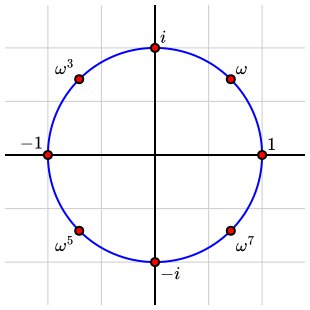
A second example, given in Figure 5.1.3, shows how labels can be managed within a <repeat> element.
Figure 5.1.3. The \(8^{th}\) roots of unity.
Listing 5.1.4. The PreFigure source for Figure 5.1.3.
<diagram width="300" height="300" margins="5">
  <definition>
    alignments=['ne','ne','ne','nw','nw','sw','se','se']
  </definition>
  <definition substitution="no">
    labels=['1','\omega','i','\omega^3','-1','\omega^5','-i','\omega^7']
  </definition>
  <definition>f(t)=(cos(pi*t/4),sin(pi*t/4))</definition>
  <coordinates bbox="[-1.4,-1.4,1.4,1.4]">
    <grid at="grid" />
    <axes at="axes" labels="no" />
    <circle at="unit-circle" center="(0,0)" radius="1" stroke="blue"/>
    <repeat parameter="k=0..7">
      <point at="point" p="f(k)" alignment="alignments[k]">
        <m>${labels[k]}</m>
      </point>
    </repeat>
  </coordinates>

  <annotations>
    <annotation id="figure" text="The eighth roots of unity">
      <annotation id="axes" text="The coordinate axes" />
      <annotation id="grid" text="The coordinate grid" />
      <annotation id="unit-circle" text="The unit circle" circular="true">
        <annotation id="point-k_0"
                    text="The primitive eighth root of unity to the power zero"
                    speech="one"/>
        <annotation id="point-k_1"
                    text="The primitive eighth root of unity"
                    speech="omega"/>
        <annotation id="point-k_2"
                    text="The primitive eighth root of unity squared"
                    speech="i"/>
        <annotation id="point-k_3"
                    text="The primitive eighth root of unity cubed"
                    speech="omega cubed"/>
        <annotation id="point-k_4"
                    text="The primitive eighth root of unity to the fourth"
                    speech="minus one"/>
        <annotation id="point-k_5"
                    text="The primitive eighth root of unity to the fifth"
                    speech="omega to the fifth"/>
        <annotation id="point-k_6"
                    text="The primitive eighth root of unity to the sixth"
                    speech="minus i"/>
        <annotation id="point-k_7"
                    text="The primitive eighth root of unity to the seventh"
                    speech="omega to the seventh"/>
      </annotation>
    </annotation>
  </annotations>
</diagram>
Lines 5 through 7 define a set of labels, one for each of the eight points. Remember that ^ is usually interpreted as the numerical exponentiation operator. Since we wish to preserve this character for the label, we include the attribute @substitution="no" to prevent ^ being reinterpreted. Notice that the label is given as ${labels[k]} since anything inside ${...} is evaluated in the user namespace.
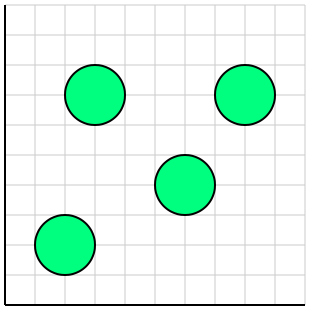
It is also possible to define the @parameter attribute so that we iterate over a list. For instance @parameter="point in [[0,0],[3,0],[0,4]]" the elements inside the <repeat> will be visited three times with the value of point being set to each of the points in the list. This is demonstrated in Figure 5.1.5.
Figure 5.1.5. Using a <repeat> to iterate over the elements in a list.
Listing 5.1.6. The PreFigure source for Figure 5.1.5.
<diagram dimensions="(300,300)" margins="5">
  <coordinates bbox="(0,0,10,10)">
    <definition>centers=((2,2),(3,7),(6,4),(8,7))</definition>
    <grid-axes decorations="no"/>
    <repeat parameter="center in centers">
      <circle center="center" radius="1"
              fill="springgreen" stroke="black"/>
    </repeat>
  </coordinates>
</diagram>
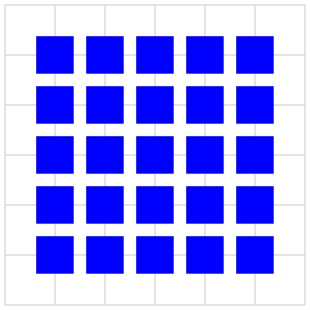
We can also nest <repeat> elements as illustrated in Figure 5.1.7 and PreFigure source Listing 5.1.8.
Figure 5.1.7. A <repeat> nested inside another.
Listing 5.1.8. The PreFigure source for Figure 5.1.7.
<diagram dimensions="(300,300)" margins="5">
  <coordinates bbox="[-1,-1,5,5]">
    <grid/>
    <repeat parameter="row=0..4">
      <repeat parameter="col=0..4">
        <rectangle at="rectangle" center="(col, row)"
                   dimensions="(3/4,3/4)" fill="blue"/>
      </repeat>
    </repeat>
  </coordinates>
</diagram>
A typical handle for one of these rectangles is @at="rectangle-row_2-col_1".